
Compliance
SMS & Transactional Notification Consent
Last updated: July 2026
1OR uses SMS and in-app notifications exclusively for time-sensitive surgical workflow coordination. This page explains how consent is collected, what the messages contain, and how the invite and Join1OR process works.
The exact consent language
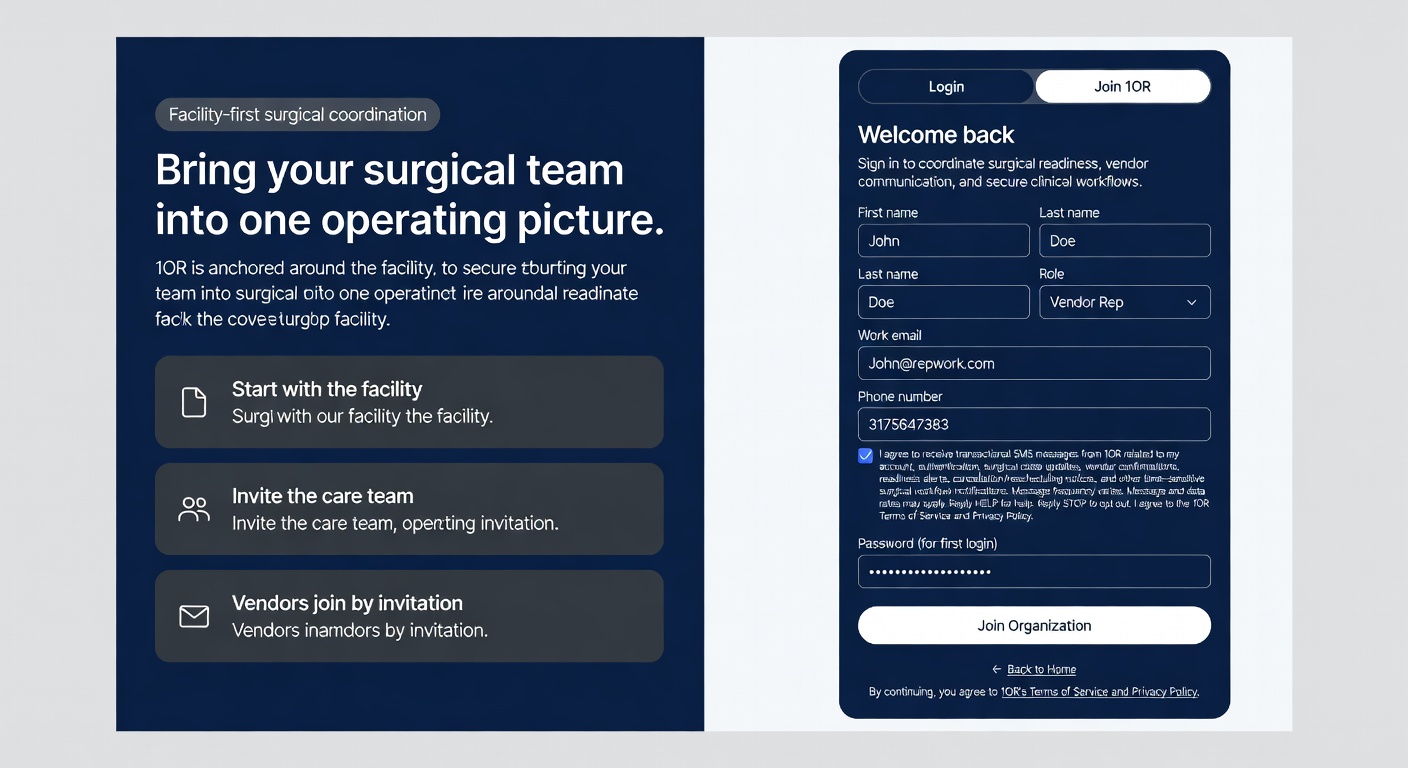
This language appears as a small checkbox during the Join1OR process after you enter organization verification credentials (access code or invite details).
Where and when consent is collected
Consent is collected on the Join1OR screen after you successfully verify your organization (via access code or invite token). You must enter a phone number to receive operational alerts. The checkbox sits directly under the phone number field and must be checked to proceed with SMS-enabled registration.
Checking the box records your affirmative consent for transactional (not marketing) messages only.
How the invite and Join1OR process works
All messages are transactional and tied to active surgical cases or your account. Marketing messages are never sent via this channel.
Consent prompt during Join1OR
This is the exact screen users see after entering organization verification credentials. The checkbox appears directly under the phone number field.
Opting out or getting help
Reply STOP to any 1OR message to opt out of SMS immediately. Reply HELP for support contact details. You can also manage notification preferences inside the application after logging in.
Opting out of SMS does not affect your ability to use the 1OR platform via web or email notifications.